Automatic settings change history
Authorized wp-admin, REST, and WP-CLI requests are captured after their first Options API write. Each request becomes a separate observation.

ConfigOps records settings changes locally across single-site and Multisite installations, then only rolls back values that still match the captured state.
Edit the current value below. ConfigOps enables Undo only while it still equals the result recorded after the save.
Captured after the save
noreply@agency.exampleSafe to undo.
The current value still matches the captured state.ConfigOps stores a local record of supported settings writes. One save appears as one before-and-after diff; Undo appears only for adapter-backed values or opt-in Smart Undo paths with complete evidence and no current-state conflict.
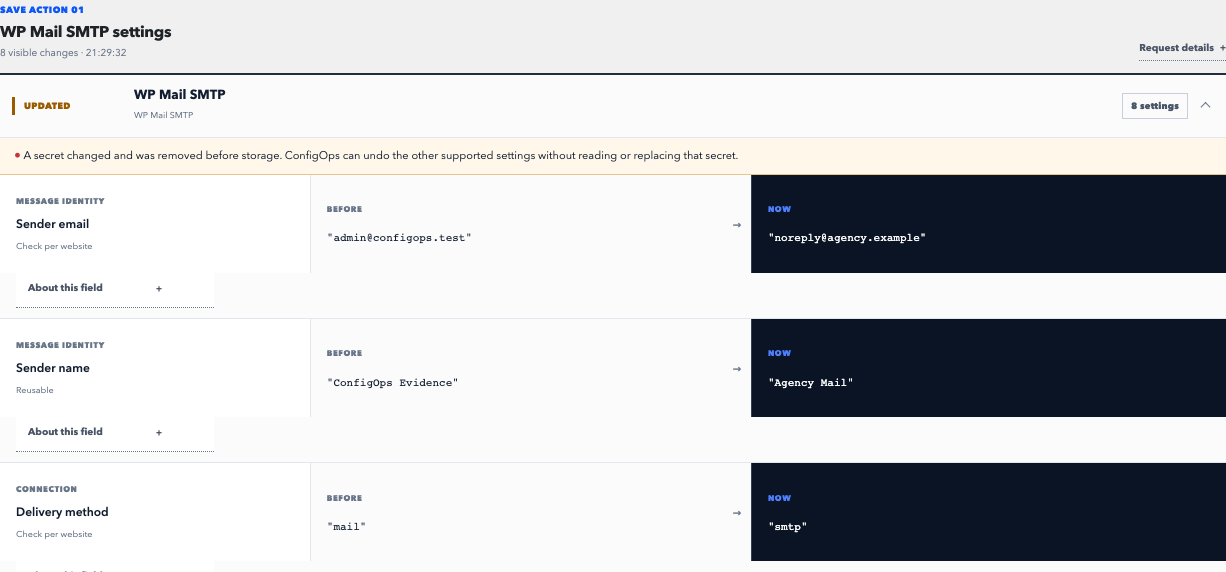
Authorized wp-admin, REST, and WP-CLI requests are captured after their first Options API write. Each request becomes a separate observation.
ConfigOps groups every supported Options API write caused by the request, reduces repeated writes to the original and final value, and identifies the responsible component and code path where possible.
Before restoring a value, ConfigOps checks that the database still matches the captured result. If someone changed it later, Undo is blocked instead of silently overwriting newer work.
Opt in to restore verified changed keys inside ordinary associative wp_options arrays. ConfigOps preserves unrelated later sibling edits and refuses ambiguous structures, secrets, conflicts, and adapter-owned options.
Evidence stays inside the WordPress database for 30 days by default. Probable credentials are redacted before storage, and incomplete or version-uncertain observations fail closed.
Network activation keeps every site ledger isolated and adds a separate Network Admin view. Named Network Change Sessions group network evidence, while supported additions and updates remain individually undoable.
Adapter-backed values and opt-in verified keys in ordinary plugin arrays that still match the result captured after the original save.
Redacted credentials. Supported neighboring settings may be restored while the current secret remains untouched.
Content, plugin and theme code, files, caches, remote services, and values in custom plugin tables without an explicit adapter.
Tested contracts: WordPress Core 7.0–7.1, WP Mail SMTP Free 4.7–4.9, Yoast SEO Free 28.1–28.3, and WooCommerce 10.3/10.7/10.9/11.0. Smart Undo is a separate opt-in structural path for unclaimed ordinary arrays and still fails closed when its snapshot proof is incomplete.
Read the support contractConfigOps observes supported Options API mutations caused by authorized WordPress admin, REST, and WP-CLI requests. It does not record anonymous front-end traffic as settings evidence. Named Change Sessions can group several requests into one investigation.
Before restoring a value, ConfigOps checks that the current database value still matches the result captured after the original save. If somebody changed it later, Undo is blocked instead of overwriting the newer change.
No. A backup restores broad site state, an activity log records events, and plugin rollback replaces code. ConfigOps explains supported setting writes behind a save and restores only values that still pass its safety checks.
Probable secret fields and options are replaced before mutation history is stored. Supported adapters may undo neighboring non-secret fields while preserving the current credential. ConfigOps never reconstructs a redacted secret.
Evidence remains in the website’s own WordPress database and is kept for 30 days by default while ConfigOps is active. Developers can change the window with the configops_retention_days filter. Uninstalling ConfigOps removes its observation history and installation data.
ConfigOps can observe WordPress Options API writes broadly. Opt-in Smart Undo covers verified keys inside ordinary, unclaimed associative wp_options arrays—even without a dedicated adapter. Custom tables, direct SQL, ambiguous structures, secrets, and conflicting current values remain outside that path. Version 0.7.0 has pinned semantic contracts for WordPress Core 7.0–7.1, WP Mail SMTP Free 4.7–4.9, Yoast SEO Free 28.1–28.3, and WooCommerce 10.3/10.7/10.9/11.0.
Yes. Version 0.7.0 supports network activation, isolated evidence for every site, a separate Network Admin ledger, and named Network Change Sessions. Complete network option additions and updates can be undone one mutation at a time. Network deletes, whole-session undo, cross-site aggregation, and bulk actions remain unavailable.
Human confirmation remains the default. A separately authorized service user can undo one site mutation through the ConfigOps Ability or WP-CLI command only when it has the configops_apply capability and sends the exact danger acknowledgement. ConfigOps then repeats the normal conflict and safety checks; it does not expose a generic settings writer.
ConfigOps 0.7.0 requires WordPress 7.0 or later and supports PHP 8.2 through 8.5. It works on single-site and network-active WordPress Multisite installations, is free under GPL-2.0-or-later, and needs no external account.
Disposable browser demo. No account or WordPress site required.
Install on WordPress.org