
Settings history · Field guide 01
WordPress Settings History: See What Changed and When
The short answer.
WordPress does not keep one complete, readable history for Core and plugin settings. ConfigOps adds a local ledger for supported setting writes, showing the request, time, actor, and before-and-after values behind each observed save.
Read the practical guideA settings history must answer more than “who clicked save?”
A settings record must connect the human action to the database writes it caused. An event log without before-and-after values cannot support value-level diagnosis or recovery.
Context
Who, when, and where
The acting user, request time, admin screen, and responsible component narrow the investigation.
Evidence
Before and after values
The original and final setting values reveal what the save changed—not only that a save happened.
Recovery
A current-state check
Before undo, the stored value must still match the observed result so newer work is not overwritten.
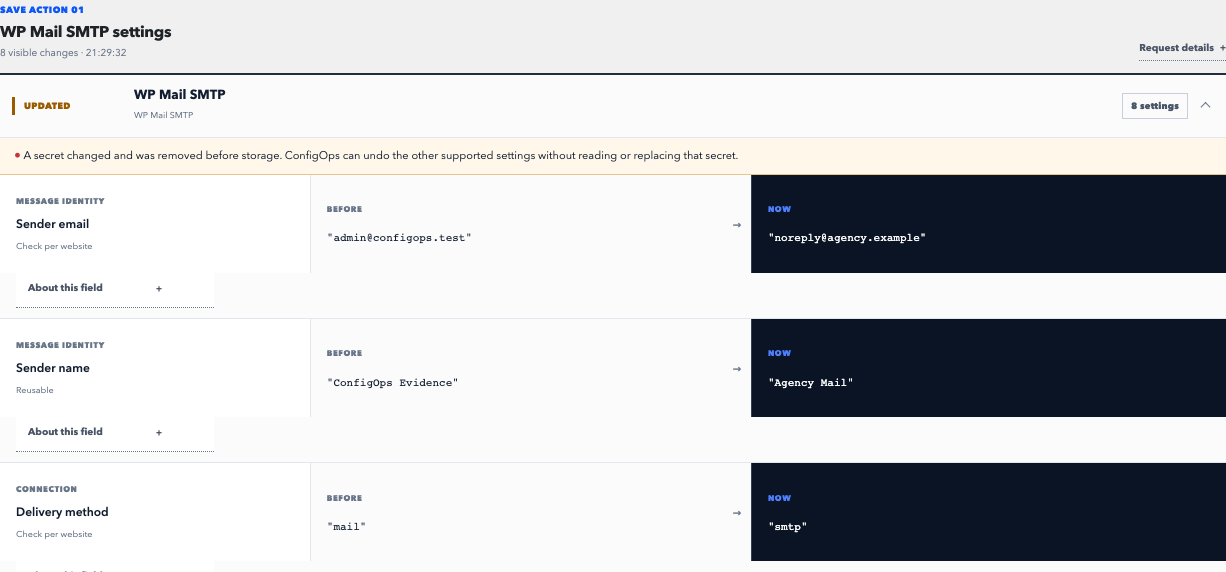
One save becomes one reviewable record.
ConfigOps observes supported Options API writes caused by an authorized wp-admin, REST, or WP-CLI request and reduces repeated writes to their original and final state.
- 01
Find the observation
Use its timestamp, screen, user, and component to match the record to the incident you are investigating.
- 02
Read the whole diff
Review every captured write. One settings screen can update multiple options or fields in one stored array.
- 03
Undo only if safe
A newer value creates a conflict. ConfigOps blocks the restore instead of treating old evidence as permission.
Evidence stays in WordPress. A conflict, redacted value, incomplete observation, or unsupported storage path prevents automatic Undo.
Read the support contractRecovery procedure
Match the request. Check the current value. Choose the restore scope.
What WordPress keeps by default
WordPress has purpose-built history in some areas. Posts and pages can have revisions, and update systems can report installed code versions. Those systems do not form a universal timeline for values saved by Core settings screens and plugins.
Most configuration is stored through the WordPress Options API, while some plugins use custom tables or remote services. Without a dedicated observer, the database usually contains the current value—not a clear explanation of the save that produced it.
ConfigOps cannot reconstruct changes made before it was active. Install it before the next incident so the original request can be observed.
How to read a settings change record
Start with the user action, not an isolated option name. Confirm the time and screen, then inspect the complete before-and-after diff. Plugins often store several visible fields together, and a single click can also cause housekeeping writes that are not the setting you intended to change.
Treat redaction and incomplete evidence as boundaries, not inconveniences. ConfigOps replaces probable secrets before persistence and does not reconstruct them later. If a request ended incompletely or a component version is outside a tested contract, automatic Undo stays unavailable where safety cannot be proven.
Retention, storage, and scope
ConfigOps stores its evidence inside the site’s own WordPress database and keeps it for 30 days by default while the plugin is active. The retention window can be changed by a developer, but a longer window also means retaining more operational data.
The ledger covers supported option writes. It does not replace content revisions, file backups, code rollback, or monitoring of custom plugin tables without an explicit adapter. Those layers require their own history or recovery system.
- Keep tested backups for broad disaster recovery.
- Use an activity log when event accountability is the main requirement.
- Use settings evidence to explain and reverse a specific configuration save.
Sources and next steps
Undo boundaries
Can ConfigOps undo this save?
Check whether the request was observed, its evidence is complete, and current values still match.
Can ConfigOps show changes made before installation?
No. It must observe the original request to record reliable before-and-after evidence and later verify a safe undo.
Is settings history the same as an activity log?
No. An activity log usually records an event and actor. Settings history records the affected values and their before-and-after state.
Where does ConfigOps store the history?
Evidence remains in the website’s own WordPress database and is retained for 30 days by default while ConfigOps is active.