
Change tracking · Field guide 02
How to Track WordPress Settings Changes
The short answer.
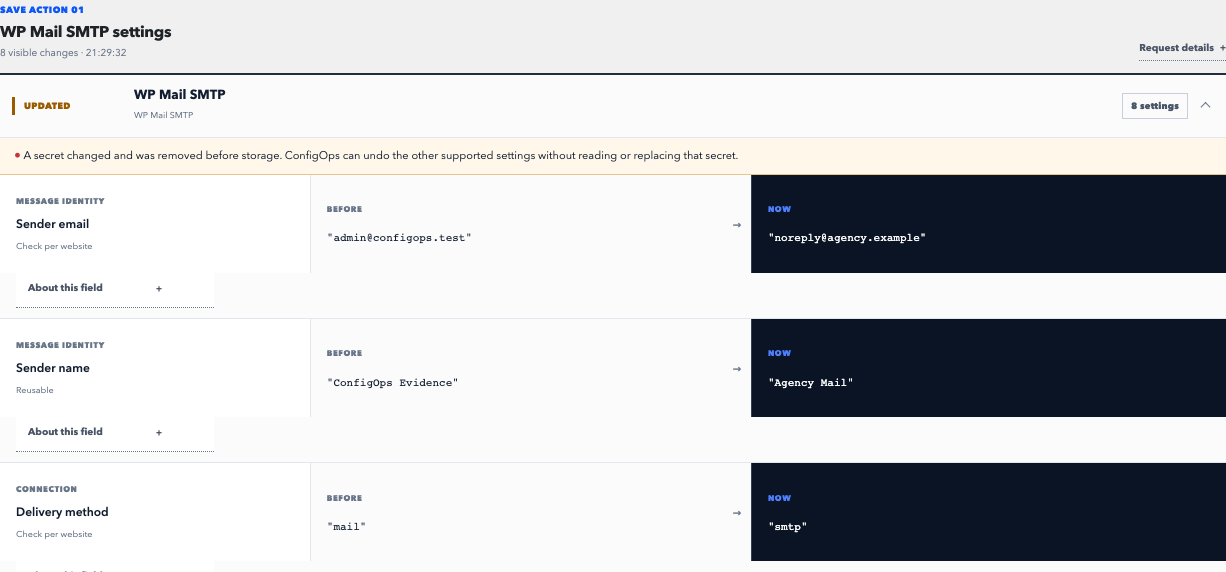
Install a settings observer before changes happen, reproduce one controlled save, then review the actor, request context, and complete before-and-after diff. ConfigOps performs that tracking locally for supported Options API writes and groups one request into one observation.
Read the practical guideTrack the request, its writes, and the result.
A timestamp alone is weak evidence. Reliable tracking begins before the save and preserves enough context to separate the intended field from neighboring plugin writes.
Before
Define the change
Record the target screen, expected field, acting user, and a test that will prove the result.
During
Observe one request
Make one controlled save through wp-admin, REST, or WP-CLI so cause and effect stay attributable.
After
Review and verify
Read all resulting writes, test the site behavior, and preserve the observation with the incident record.
Track authorized option writes; exclude anonymous traffic.
ConfigOps listens for supported option mutations during authorized requests. Anonymous front-end traffic is excluded from settings evidence, and probable credentials are redacted before a record is stored.
- 01
Install before the change
There is no reliable retroactive reconstruction. Start observation before a maintenance window or incident occurs.
- 02
Change one concern
Avoid mixing unrelated edits. Small saves produce evidence that is easier to read, test, and reverse.
- 03
Attach the evidence
Keep the observation time and result with the ticket, runbook, or maintenance note that authorized the change.
Evidence stays in WordPress. A conflict, redacted value, incomplete observation, or unsupported storage path prevents automatic Undo.
Read the support contractRecovery procedure
Match the request. Check the current value. Choose the restore scope.
Track one controlled save from request to verification
Begin with a narrow hypothesis: identify the setting you expect to change and the behavior it controls. Take a current backup before risky work, use staging when available, and avoid changing several plugin screens in one step.
After the save, match the ConfigOps observation by request time, screen, and acting user. Read every captured mutation, then test the behavior you intended to affect. The observation explains database state; the functional test proves the operational outcome.
- Change owner, approver, and approximate time.
- WordPress screen, REST route, or WP-CLI command used.
- Expected field, old state, new state, and verification result.
- Observation identifier or screenshot linked to the work item.
Know what your tracker can see
WordPress and many plugins store configuration with the Options API. Those writes are the core observation surface for ConfigOps. Plugins can also write custom database tables, files, caches, or remote service state; those layers need their own logging or an explicit adapter.
Tracking coverage should be tested against the exact component version you operate. ConfigOps 0.7.0 has pinned adapter contracts for WordPress Core 7.0–7.1, WP Mail SMTP Free 4.7–4.9, Yoast SEO Free 28.1–28.3, and WooCommerce 10.3/10.7/10.9/11.0. It can also opt in to structural Smart Undo for verified keys in ordinary, unclaimed associative option arrays. Custom tables and direct SQL remain outside that generic path.
A recorded write can help diagnosis even when automatic Undo is unavailable. Recovery still requires complete evidence and a current-state match.
Use the history in production operations
For scheduled work, make named, focused changes and review the resulting evidence before closing the maintenance task. During an incident, stop repeated saves, identify the first harmful request, and compare its writes with the current database state.
Keep settings tracking beside—not instead of—backups and activity logging. Backups cover broad restoration; activity logs support accountability; settings evidence gives you the value-level explanation needed for a targeted reversal.
Sources and next steps
Undo boundaries
Can ConfigOps undo this save?
Check whether the request was observed, its evidence is complete, and current values still match.
Can I track changes made with WP-CLI or REST?
Yes, ConfigOps can observe supported option mutations caused by authorized wp-admin, REST, and WP-CLI requests.
Does settings tracking capture passwords and API keys?
Probable secret fields and options are replaced before history is stored. ConfigOps never reconstructs a redacted secret.
Will it track plugins that use custom tables?
Not automatically. Understanding custom tables requires an explicit adapter for that storage model.