
Mail recovery · Field guide 04
How to Undo WP Mail SMTP Settings Changes
The short answer.
If ConfigOps observed the WP Mail SMTP save, open that record, inspect the full diff, and undo supported non-secret values only while they still match the captured result. ConfigOps never restores a redacted password or API key; verify delivery with a controlled test after recovery.
Read the practical guideRestore mail configuration without exposing credentials.
Mail settings combine visible routing fields with sensitive credentials and remote provider state. Recovery has to keep those layers separate.
Visible
Review routing values
Sender address, sender name, mailer selection, and related fields can explain the delivery change.
Secret
Preserve credentials
Probable passwords, tokens, and API keys are redacted before storage and are never reconstructed.
External
Test the provider path
A correct database value still needs a delivery test because DNS, provider policy, and remote accounts sit outside WordPress.
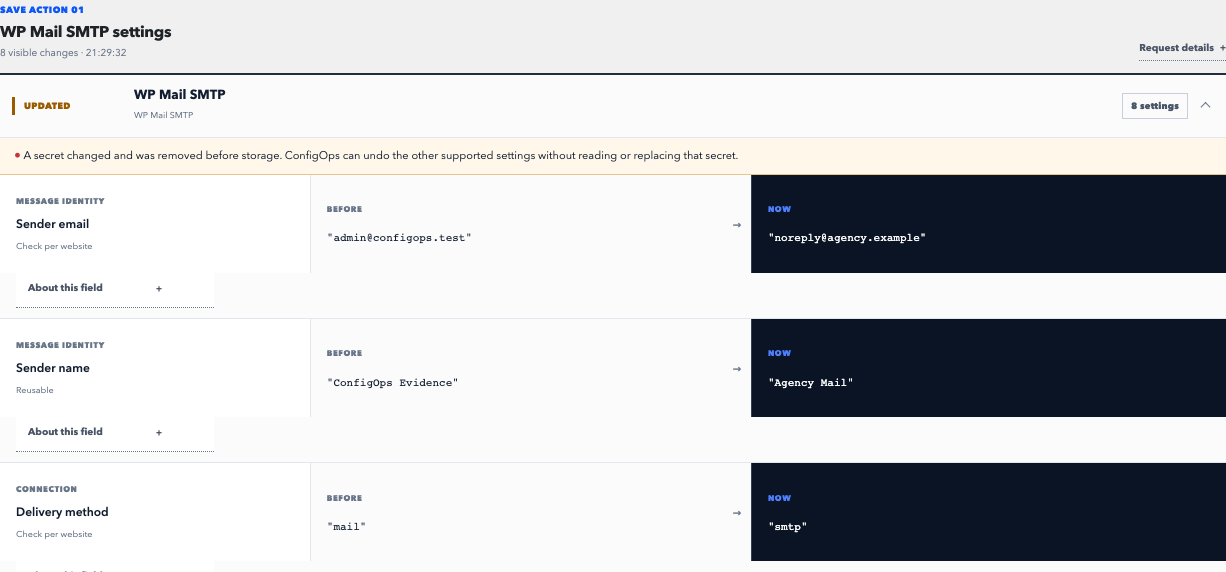
One WP Mail SMTP save can change routing, flags, and a secret.
The ConfigOps review keeps the request together, makes supported values readable, and marks the credential boundary before any history is stored.
- 01
Locate the mail save
Match the observation to the acting user, time, and WP Mail SMTP settings request.
- 02
Separate values from secrets
Review restorable fields while treating redacted credentials as intentionally unavailable evidence.
- 03
Undo, then send a test
After a conflict-checked reversal, verify WordPress, provider, and recipient behavior with a controlled message.
Evidence stays in WordPress. A conflict, redacted value, incomplete observation, or unsupported storage path prevents automatic Undo.
Read the support contractRecovery procedure
Match the request. Check the current value. Choose the restore scope.
Undo a change ConfigOps observed
Find the observation that matches the failed mail change and read all captured mutations. A familiar sender address may be only one part of the request; mailer selection, enforcement flags, return paths, or plugin housekeeping can change alongside it.
ConfigOps offers automatic Undo only for complete, supported evidence. It first checks that every restorable current value still matches the post-save value in the observation. If another administrator has changed a value since then, the restore is blocked.
ConfigOps 0.7.0 pins its adapter contract to WP Mail SMTP Free 4.7–4.9. Untested versions retain evidence but do not receive adapter-dependent automatic Undo.
Why credentials are not part of Undo
A history system should not turn a password or API key into long-lived diagnostic data. ConfigOps identifies probable secret fields and options and replaces their values before the mutation record is persisted.
That means a neighboring non-secret setting can be restored while the current credential remains untouched. If the credential itself is wrong, rotate or re-enter it through the provider’s documented process. Do not expect a settings history to reveal its former value.
Verify the complete delivery path
After the targeted reversal, send a controlled test to an address you can inspect. Confirm the WordPress-side result, then check provider logs and the receiving mailbox. A successful settings save alone does not prove delivery.
If mail still fails, preserve the current configuration and investigate layers outside ConfigOps: DNS records, provider authentication, sending limits, account status, firewalls, and recipient filtering. Those systems are not restored by a WordPress option undo.
- Confirm the intended sender name, sender address, and selected mailer.
- Use a non-sensitive test message with a unique subject.
- Check plugin diagnostics and remote provider logs.
- Record the test recipient, time, outcome, and related observation.
Sources and next steps
Undo boundaries
Can ConfigOps undo this save?
Check whether the request was observed, its evidence is complete, and current values still match.
Will Undo restore my SMTP password or API key?
No. Probable secrets are redacted before storage, and ConfigOps never reconstructs them during Undo.
Why is automatic Undo unavailable on my version?
Adapter-dependent Undo requires a pinned, tested component contract. Evidence stays visible on untested versions, but recovery fails closed.
Does a successful Undo prove email delivery works?
No. It restores supported local settings. DNS, provider accounts, network access, and recipient filtering require separate verification.